

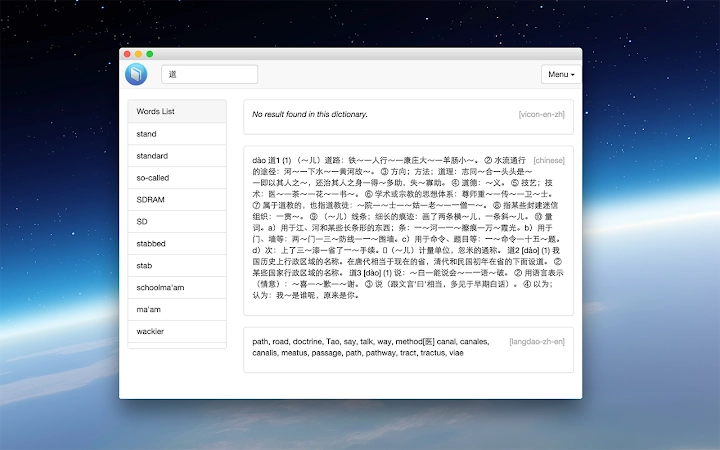
Description
Download Dictionary App – Offline English-Chinese, vi-like Keyboard Shortcuts
Overview
The software is a desktop dictionary application designed for offline English-Chinese and Chinese-English lookup. Built using web technology, it emphasizes keyboard-driven navigation, making it ideal for users who prefer minimal mouse interaction. The application supports vi-like keyboard shortcuts, allowing users to navigate and perform actions without relying on a mouse. This design choice suggests a focus on efficiency and workflow continuity, particularly for power users and developers accustomed to keyboard-centric environments.
Target users include language learners, translators, and professionals who require quick access to bilingual definitions without internet dependency. The tool is platform-independent, supporting Windows, Mac, and Linux, which enhances its accessibility across different computing environments. It syncs the word list across devices, enabling consistent access to previously looked-up terms regardless of the device used.
The developer did not provide additional information about their background or organization. The application’s motivation centers on leveraging web technologies to create a lightweight, visually appealing, and easy-to-use dictionary that operates entirely offline. Real-world usage scenarios include rapid reference during coding sessions, writing, or studying, especially in environments with limited or no internet access.
Key Features & Capabilities
- Offline Dictionary Access – Enables instant lookup of English-Chinese and Chinese-English terms without requiring an internet connection, ensuring privacy and consistent performance.
- vi-like Keyboard Shortcuts – Offers a comprehensive set of keyboard-driven commands, accessible by pressing '?' to view the full list, ideal for users familiar with vi/vim editing paradigms.
- Word List Synchronization – Automatically syncs the user’s word list across devices, maintaining a consistent personal dictionary regardless of the platform or machine used.
- Smart Word Suggestions – Provides intelligent autocomplete and context-aware suggestions to speed up the lookup process and reduce typing errors.
- Customizable Interface – Allows users to tailor the appearance and behavior of the application to match their workflow and aesthetic preferences.
- Platform Independence – Built with web technology, ensuring compatibility across Windows, Mac, and Linux systems without the need for separate native builds.
These features collectively support a seamless, efficient workflow for users who prioritize speed and minimal disruption. For example, a developer using Xmonad on Linux can quickly check a term with a few keystrokes, while a student studying Chinese can review previously looked-up words across multiple devices. The reliance on keyboard shortcuts reduces cognitive load and enhances typing flow, especially during long writing or coding sessions.
User Interface, Workflow & Performance
The application’s user interface is designed around keyboard navigation, with minimal reliance on mouse input. The layout appears streamlined, prioritizing text clarity and accessibility. Navigation is achieved entirely through keyboard shortcuts, which are documented in the application via a dedicated help prompt.
Workflow efficiency is enhanced by the integration of smart word suggestions and persistent word lists. Users can quickly access frequently used terms without re-typing, and the interface responds promptly to input, reflecting the application’s offline nature and optimized performance. The developer did not specify resource usage details, but the 24.2 MB installation size suggests a lightweight footprint.
Performance observations are based on general software behavior patterns. The application is designed to be incredibly fast, leveraging offline data storage for immediate response times. Stability is expected to be high due to the absence of external dependencies and reliance on local data. CPU and RAM behavior were not specified, but the minimal size and offline operation imply efficient resource utilization.
Compatibility & System Requirements
The software is compatible with Windows, Mac, and Linux operating systems. It is available in version 1.0 with a file size of 24.2 MB. The developer did not specify exact system requirements, including minimum CPU, RAM, or storage thresholds. Platform compatibility information is limited to the supported OS list.
Installation is straightforward, and the application runs as a desktop application built with web technology. The developer did not provide details on hardware requirements, so users should ensure their system meets general standards for running web-based desktop apps. The lack of specified requirements means users may need to test the software on their specific setup to confirm smooth operation.
Pros and Cons
Pros
- Offline functionality ensures privacy and uninterrupted access to definitions.
- vi-like keyboard shortcuts enhance efficiency for keyboard-centric users.
- Word list synchronization across devices improves consistency and convenience.
- Lightweight at 24.2 MB, suitable for older or low-resource machines.
- Platform-independent design supports cross-platform workflows.
Cons
- Exact system requirements were not listed, which may cause uncertainty for some users.
- Performance under heavy use or on low-end hardware was not specified.
- Limited visual customization options were not detailed.
- Only English-Chinese and Chinese-English language pairs are supported.
- No built-in audio pronunciation or example sentences were mentioned.
FAQ Section
Is this dictionary app available for all major operating systems?
Yes, the application is compatible with Windows, Mac, and Linux, making it accessible across different desktop environments.
Can I use this dictionary without an internet connection?
Yes, the dictionary operates entirely offline, allowing users to look up words without requiring an internet connection.
Does the app support custom keyboard shortcuts?
The app supports vi-like keyboard shortcuts, and users can access the full list by pressing '?'. Customization of these shortcuts was not specified.
Is the software free to download and use?
Yes, the application is available at no cost, with no licensing fees or subscription requirements.
Can I sync my word list across multiple devices?
Yes, the word list is synchronized across devices, ensuring consistent access to your personal dictionary regardless of the machine used.
Final Thoughts + CTA
This desktop dictionary stands out for its focus on efficiency, privacy, and cross-platform usability. Its keyboard-first design caters to power users and developers who value speed and minimal disruption. The offline operation, combined with word list synchronization and a lightweight footprint, makes it a strong choice for language learners and professionals working in constrained environments.
While the lack of detailed system requirements and limited language support may be drawbacks for some, the core functionality is solid and well-executed. For users who prefer vi-style workflows and rely on consistent, fast access to bilingual definitions, this tool delivers significant value.
Download Dictionary App now
Guides & Tutorials for Victionary App for Chrome
How to install Victionary App for Chrome
- Click the Preview / Download button above.
- Once redirected, accept the terms and click Install.
- Wait for the Victionary App for Chrome download to finish on your device.
How to use Victionary App for Chrome
This software is primarily used for its core features described above. Open the app after installation to explore its capabilities.
User Reviews for Victionary App for Chrome 0
No reviews found





